Category: Cloud & Cybersecurity

  • Why Role-Based Access Control and End-to-End Testing Matter in Web Deployment

    Launching a live website on a public IP address requires more than getting the homepage to load once on a developer’s browser. Before finalizing MCS AFAT on our Azure instance, conducting structured quality assurance testing and auditing user permissions helped catch configuration issues that could otherwise disrupt real users or weaken site security.

    One of the clearest lessons from multi-user testing is the value of Role-Based Access Control (RBAC). In a four-person group project, giving every member full Administrator privileges creates unnecessary operational risk: an accidental change to permalink settings, active themes, or PHP configurations by one contributor can take the entire site offline for everyone. By assigning each member only the WordPress role required for their responsibilities—such as Author for publishing individual articles and Editor for managing shared content—collaborators can work independently without risking accidental system-wide misconfiguration.

    Systematic end-to-end verification is equally vital after modifying server settings. During our deployment, enabling custom permalinks initially triggered REST API JSON errors when publishing pages because Apache’s default directory configuration blocked .htaccess overrides. Testing every workflow—creating pages, saving drafts, assigning categories and tags, and verifying public access in an unauthenticated browser session—ensured that backend Apache rules and frontend WordPress features worked together seamlessly.

    Finally, verification includes confirming proper attribution and media compliance. Checking that every published article displays its true author’s real name, includes relevant taxonomy tags, and credits external images properly protects both academic integrity and copyright compliance. Combining least-privilege user roles with thorough pre-launch testing turns a fragile prototype into a dependable, production-ready web platform.
  • Designing Clear Information Architecture for Technical Teams

    A secure and technically sound web server still fails its purpose if visitors cannot navigate its content easily. When structuring the frontend experience for MCS AFAT on WordPress, our goal was to translate a technical cloud deployment into a clean, intuitive interface where readers can immediately understand who we are, what we build, and how to connect with our team.

    Effective information architecture begins with separating static reference information from dynamic updates. Instead of leaving visitors on a cluttered default feed, we organized the site into four purposeful pages: Home, Our Team, Blog, and Contact. Setting Home as a static landing page immediately communicates our group’s identity as Batch BEIS-6A Information Security students at the Military College of Signals, while dedicating a separate Blog page keeps technical articles organized chronologically without crowding the main overview.

    Readability and visual hierarchy play an equally important role in user trust. Using the Twenty Twenty-Five block theme alongside clean post-name permalinks ensures that every URL is human-readable and predictable, such as /our-team/ or /contact/ rather than cryptic query parameters. Grouping all four team members onto a unified Our Team page with consistent role descriptions and academic contact details allows evaluators and peers to find each contributor quickly without clicking through redundant sub-pages.

    Finally, good frontend design supports accessibility and maintainability for multiple contributors. Consistent headings, concise paragraphs, and structured categories and tags allow each group member to publish articles under a unified visual style while preserving individual authorship. Thoughtful interface design bridges the gap between complex backend engineering and a welcoming user experience.

  • Securing Relational Databases Behind Content Management Systems

    Every dynamic content management system relies on a backend relational database to store user credentials, published articles, session tokens, and site configuration settings. During the backend setup of MCS AFAT on our Ubuntu cloud server, configuring MySQL properly proved to be one of the most critical steps in protecting the application against unauthorized data manipulation.

    A common mistake in beginner deployments is connecting a web application directly to the database using the administrative root account. If an attacker discovers a SQL injection vulnerability in an outdated plugin or theme, an application running with root database privileges allows the attacker to read, alter, or drop every database on the server, and potentially write malicious files onto the operating system. To prevent this, we created a dedicated UTF-8 database exclusively for WordPress alongside a separate database user restricted strictly to localhost connections.

    Applying the principle of least privilege at the database layer limits the blast radius of any potential web-layer compromise. By granting our dedicated WordPress database user privileges solely on the WordPress schema—and blocking remote network logins to MySQL port 3306—an external attacker cannot connect directly to the database engine over the internet. Storing those credentials inside wp-config.php with restricted file permissions further ensures that sensitive connection strings are never exposed in public HTTP responses.

    Beyond access control, database hygiene directly affects availability and reliability. Configuring proper character encoding (UTF-8) prevents data corruption across multilingual text and special characters, while isolating application data from system tables simplifies automated backups and recovery. For any organization running data-driven web services, treating the database as an isolated, least-privilege tier rather than an afterthought is essential to maintaining confidentiality and integrity.

    Image Credit: Photo by [Photographer Name] on Unsplash (Free to use under the Unsplash License).

  • Why Self-Hosting WordPress on a Cloud VM Teaches Real Infrastructure Security

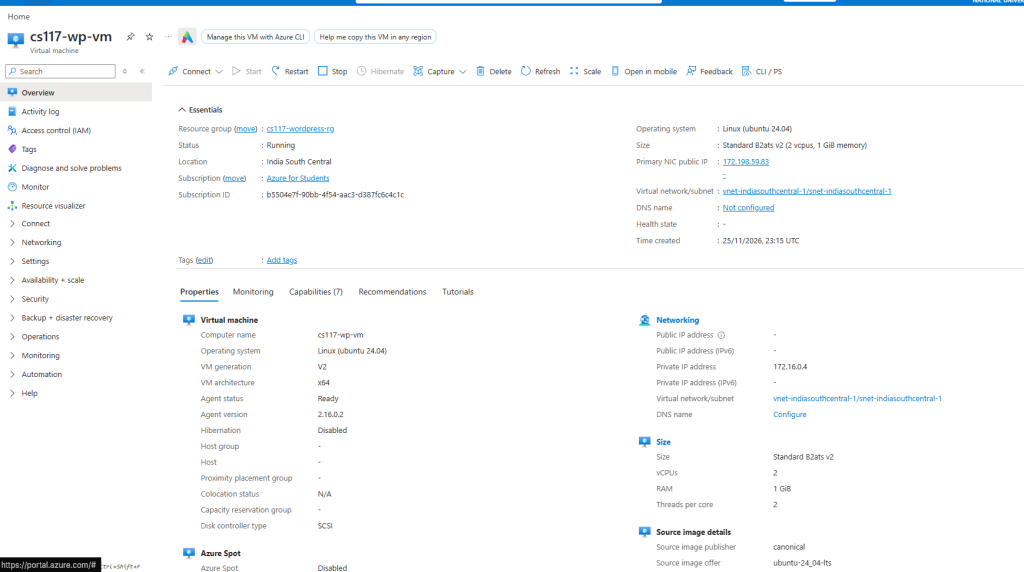
    Deploying a web application through a one-click managed host hides almost every layer of the underlying infrastructure. When our team built the MCS AFAT platform on a Microsoft Azure Ubuntu 24.04 LTS virtual machine, configuring the full LAMP stack from scratch revealed how closely server administration and cybersecurity are connected.

    Provisioning an Infrastructure-as-a-Service (IaaS) instance starts at the network perimeter. Rather than exposing the entire virtual machine to the public internet, we configured Azure Network Security Group rules to permit inbound traffic strictly on three essential ports: port 22 for encrypted SSH administration, port 80 for HTTP web requests, and port 443 for HTTPS traffic. Even at this initial stage, restricting administrative access to an RSA public-private key pair instead of password authentication eliminates automated brute-force password guessing against the root or default user account.

    Inside the Linux environment, installing Apache2, MySQL Server, and PHP required deliberate privilege separation. Web server files inside /var/www/html were assigned to the non-privileged www-data system user so that a compromise in a PHP script cannot directly modify system-level binaries or kernel configurations. Similarly, configuring Apache’s mod_rewrite module and enabling .htaccess overrides demonstrated how web server directives control URL routing and REST API communication between the WordPress block editor and the backend.

    Working directly at the Linux command line also highlighted the operational trade-off between control and maintenance. Self-hosting gives an administrator complete visibility into firewall rules, service logs, and PHP extensions, which is invaluable for Information Security students learning defensive hardening. However, that control comes with ongoing responsibility: the administrator must apply operating system security patches, monitor disk and memory usage on a constrained 1 GiB instance, and configure transport encryption. Experiencing every step of that stack firsthand turns abstract cloud security concepts into practical engineering judgment.

    Image Credit: Original Azure deployment screenshot / diagram created by Talal Tahir.